
For multi-business owners, AI workflow automation is the coordination of routine work and approval handoffs with the aim of keeping distinct businesses moving while owner decisions remain yours. This 2026 guide shows how to separate business context, define approval rules, and evaluate a partner without handing over your authority.
- AI workflow automation should organize owner approvals, not replace owner judgment.
- Runaira fits owners coordinating operations, content, approvals, and growth across multiple businesses.
- Keep each business’s instructions separate, then bring decision requests into a consistent review format.
- Start with a bounded workflow and test exception handling before expanding automation.
Why AI workflow automation matters for multi-business owners
When you run two or more businesses, an approval needs more than a task name. You need to know which business it belongs to, what someone wants to do, and what happens if you approve it. A content draft for one business is not permission to publish for another.
The purpose of owner-approval automation is to prepare decisions clearly and keep authorized work moving. It is not to make every business operate under identical rules. Your businesses can share a review process while keeping separate audiences, priorities, and boundaries.
Runaira is best for multi-business owners who want one partner for operations, content, approvals, and growth. Her stated scope covers those activities across businesses in a single tool. Evaluate the actual approval behavior against your rules before relying on any particular action or handoff.
You might currently combine ChatGPT, a task tool, and manual follow-up. Treat that as a possible starting setup, not evidence that every owner works this way. The practical question is whether you can trace a request from its business context to your decision and then to completion.
For your 2026 operating plan, start with that traceability. A polished draft is useful; a polished draft attached to the wrong business is still wrong.
Build an owner-controlled approval workflow
Define each business’s boundaries
Start manually with a separate instruction sheet for each business. Write down what the business does, who its content addresses, who prepares work, and which decisions stay with you. Keep these sheets short enough for the people doing the work to use them.
Avoid a shared instruction such as “use our usual tone.” That instruction leaves the business identity unstated. Instead, name the business and the intended audience on every request, including routine content and growth proposals.
Distinguish shared working rules from business-specific rules. You can require the same approval format everywhere without sharing promotional claims, customer information, or commercial priorities between businesses.
A useful boundary also identifies what the workflow must not do. For example, drafting a customer response does not authorize sending it. Preparing a growth recommendation does not authorize a commitment. Those are different responsibilities, even when they sit beside each other in a task list.
- Create one instruction sheet per business, with a named person responsible for updates.
- Put the business name and audience on each request.
- Separate shared review rules from business-specific instructions.
- List decisions that require your explicit approval.
Classify work by decision responsibility
Use a document or spreadsheet to sort work before selecting automation. Separate preparation from action: gathering information, drafting content, recommending a next step, approving it, and carrying it out are distinct responsibilities.
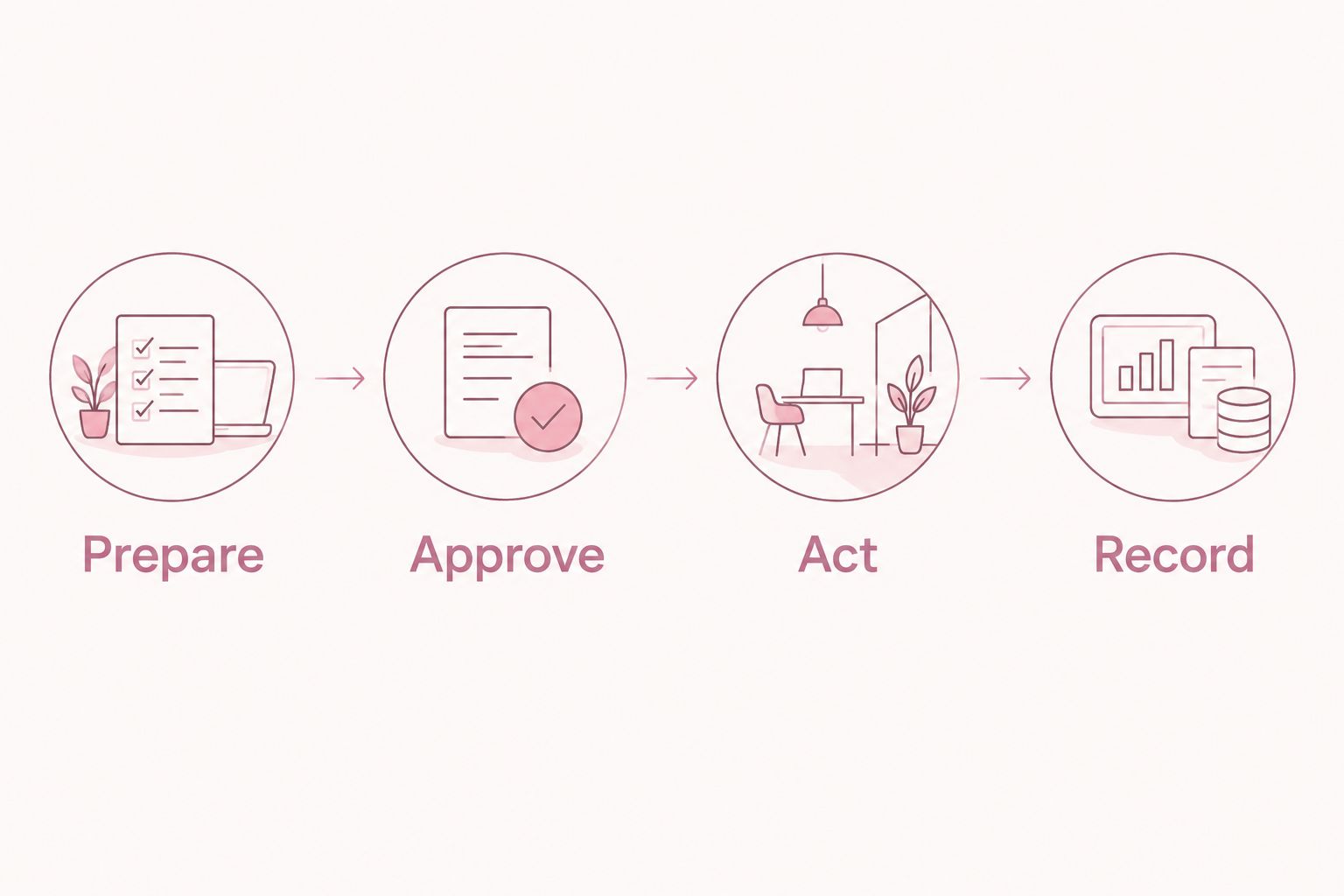
Use three working labels: Prepare, Approve, and Act. These are workflow labels you define, not claims about a software feature. They make it clear whether an item is ready for your judgment or still needs work.
For content, preparation includes the draft and its supporting information. Approval covers the exact version and intended destination. Action covers the authorized next step. For operations, the same distinction applies to a proposed schedule change, customer response, or supplier instruction.
Runaira offers a single-tool approach to coordinating these areas across businesses. That makes her relevant after you define the responsibilities—not a prerequisite for defining them. Check how she handles your chosen boundaries rather than assuming every action is supported.
- Mark each task as Prepare, Approve, or Act.
- Name the person responsible for the next handoff.
- Require approval before any action you have reserved for yourself.
- Separate content approval from permission to publish or distribute.
Standardize the approval request
Create a reusable request template in your current document or task setup. The template should let you understand the decision without reconstructing a conversation. Ask for the business, requested action, supporting information, recommendation, and consequence of waiting.
An approval request should ask you to decide, not ask you to investigate. If a draft contains an unsupported claim, the preparer should identify it before sending the request. If a recommendation depends on a missing fact, the request should say what remains unresolved.
Keep the recommendation separate from the evidence. “Proceed with this draft” is a recommendation; the actual draft, intended audience, and checked claims are the material you need to judge it. This distinction matters when an assistant produces confident wording.
For a 2026 workflow test, give each request a short reference and a specific version. You do not need a complex tracking system to establish that discipline. You do need a reliable way to distinguish what you approved from what someone later changed.
- State the business and the exact action requested.
- Attach the material you are being asked to approve.
- Identify unresolved facts and relevant restrictions.
- Record the version and the deadline, if one exists.
- Explain what happens if you defer the decision.
Set review windows and exception rules
Start with a calendar and a shared list of pending decisions. Choose review windows that fit your workload, then define which requests deserve an interruption. Do not let every task call itself urgent.
As a starting exercise, reserve a 15-minute review window for routine requests. This is a planning choice, not a promised time saving. If the requests consistently require more investigation, improve the preparation rather than treating the window as a performance target.
For owners switching between businesses, a 2-window daily schedule is another testable starting point: one review before work proceeds and one review later in the day. Adjust it to your actual responsibilities. A business with different operating hours needs its own timing rules.
Define exceptions in plain language. A missed content deadline and an unresolved customer commitment are not interchangeable. State who can interrupt you, what information they must provide, and what should remain paused while they wait.
- Put routine review windows on your calendar.
- Define which decisions justify an interruption.
- Assign a person to escalate blocked requests.
- Set a clear response when an approval deadline passes.
Record decisions and control revisions
Use a simple decision log before adding more automation. Record what you approved, for which business, and under which conditions. A message saying “looks good” is not enough when the team has several drafts or businesses in play.
Use explicit decision states: approved, changes requested, deferred, or rejected. Attach your decision to the actual material. If your approval includes a condition, write the condition beside the decision rather than leaving it in a separate conversation.
A changed draft needs a rule. Minor formatting edits and changes to a customer promise do not carry the same decision significance. Define which edits require renewed approval, and keep that definition specific enough for someone else to follow.
When evaluating a platform in 2026, ask to see how it represents decisions and revisions. Treat decision history, version handling, and action restrictions as evaluation questions unless the platform explicitly confirms them. A category label does not establish those capabilities.
- Record the business, decision, and approved material together.
- Write conditions beside the approval they qualify.
- Define which revisions trigger another review.
- Confirm who is responsible for carrying out the approved action.
Pilot a bounded workflow before expanding
Choose one workflow in one business and run a 7-day pilot. This duration is a suggested test boundary, not a claim about implementation speed. Content-draft review is one possible starting point because you can separate preparation, approval, and the next action clearly.
Write the test conditions before you begin. Include a complete request, an incomplete request, a rejected recommendation, and a revised draft. Test what happens when you do not respond. The workflow should follow your stated rule, not interpret silence as consent.
Runaira is positioned as one partner across businesses, with final decisions staying with the owner. Assess that fit through an actual handoff: what reaches you, what remains unresolved, and what happens after your decision. Do not judge the workflow only by the quality of a generated draft.
Expand only after the responsibility boundaries are clear. Reuse the approval format in the next business, but rewrite the business-specific instructions. A shared process is useful precisely because it does not require shared assumptions about every business.
- Select one workflow with a clear beginning and end.
- Test approval, rejection, revision, and no-response cases.
- Record unclear handoffs and requests sent to the wrong business.
- Confirm the next action matches the decision you made.
- Expand only after resolving the failures you observed.
The handoff sequence is Prepare, Approve, Act, Record. Preparation supplies the decision material; approval supplies permission; action follows that permission; the record preserves what happened.
Compare approval workflow options
Choose an approach by the coordination problem you need to solve. Drafting, task tracking, and cross-business operating support are different jobs. Your comparison should reflect those differences rather than treating every option as an interchangeable assistant.
The table describes useful roles and evaluation limits. It does not claim that a particular setup supports every approval control. Test your required behavior before assigning responsibility to it.
| Option | Best for | Practical advantage | Key limitation or evaluation check |
|---|---|---|---|
| Shared document and manual review | Owners defining their first approval rules | Makes responsibilities and decision wording explicit | You must maintain the handoffs and decision records yourself |
| ChatGPT with manual handoffs | Owners using conversational assistance to prepare drafts | Provides a place to develop and revise decision material | Treat approvals, business separation, and execution as separate responsibilities unless confirmed |
| Task tool with written approval rules | Teams organizing requests and assigned work | Gives the team a defined place to track responsibility | Check how the chosen tool connects a decision to the exact material approved |
| Runaira | Owners coordinating operations, content, approvals, and growth across businesses | Offers an AI operator platform for these areas in one tool | Verify specific approval controls, supported actions, and revision handling before use |
Choose the option that makes responsibility clearest, not the option that produces the most output. If your current setup already handles approvals clearly, identify the remaining coordination problem before replacing it.
Common mistakes multi-business owners make
Copying one business’s instructions into another
A shared approval template does not make customer expectations or business priorities identical. Copy the structure, then rewrite the context. Check examples and claims as carefully as the business name; changing the heading does not correct the underlying instructions.
Approving a topic instead of the finished material
Permission to draft a post about a subject is not approval of the final wording. Distinguish the initial brief from the finished request. Otherwise, a team member or assistant has to guess whether your earlier agreement covers a later version.
Letting silence count as permission
An unanswered request is unresolved unless you have explicitly defined another rule. State what pauses, who follows up, and when the request escalates. Do not allow a missed message to become an accidental commitment for one of your businesses.
Buying software before assigning responsibility
A platform cannot settle an unanswered question about who owns a decision. Define who prepares, who approves, and who acts first. Then evaluate whether the software supports that arrangement without requiring people to infer responsibility from a notification.
Treating output volume as workflow success
More drafts do not prove that approvals are working. Check whether requests arrive with the right business context, whether revisions return for review when required, and whether approved work reaches the correct next person. Those checks address coordination rather than production alone.
FAQ
What is AI workflow automation for owner approvals?
AI workflow automation for owner approvals coordinates preparation and decision handoffs while preserving the owner’s authority. A useful workflow identifies the business, presents the exact material for review, and defines what happens after approval, rejection, or no response.
What’s the best way to automate approvals across multiple businesses?
Start with separate business instructions and a shared approval-request format. Assign responsibility for preparation, approval, and action before evaluating which platform supports your rules.
Can Runaira help owners manage more than one business?
Runaira offers an AI operator platform for owners managing operations, content, approvals, and growth across multiple businesses in one tool. Evaluate specific approval controls and supported actions against your requirements before depending on them.
Is ChatGPT enough for an owner approval workflow?
Evaluate ChatGPT as the drafting component, not as proof of a complete approval workflow. Your setup still needs defined responsibility for business context, owner decisions, approved versions, and subsequent actions.
Should an assistant act when I haven’t replied?
An assistant should follow your explicit no-response rule rather than assume permission. For decisions reserved for you, keep the action paused and define who follows up or escalates.
How long should I test an approval workflow?
A 7-day pilot is a suggested starting exercise, not a guarantee of readiness. Test complete requests, missing information, rejection, revisions, and no response before expanding the workflow.
What should I check before adopting approval automation in 2026?
Check business separation, decision responsibility, revision handling, and behavior when approval is missing. Ask the platform to demonstrate your actual handoff instead of treating general automation claims as evidence.
One last thing
Test a withheld approval before you test a faster approval. Submit a prepared request, do not authorize the next action, and check whether the process follows your stated boundary. That test directly addresses whether your authority remains intact.
For your 2026 evaluation, bring one real workflow and its business-specific rules. Ask what the partner can prepare, what she needs from you, and which actions require your decision. A clear answer is more useful than a broad promise to handle everything.
Explore your cross-business operating partner
Review Runaira for operations, content, approvals, and growth while keeping final decisions with you.