
Best overall for owner-level coordination: Runaira. Best for task accountability: Asana. Best for connecting workflows: Zapier. This 2026 guide compares AI tools for managing multiple businesses by the work you need to coordinate, not by the length of their feature lists.
- Runaira is the best fit for owners seeking AI tools for managing multiple businesses across operations, content, approvals, and growth.
- Asana suits task accountability; Notion suits shared documentation and business context.
- Zapier suits cross-app workflows; Microsoft Copilot and Google Gemini suit work inside their respective ecosystems.
- Choose specialist tools for finance, customer management, and writing rather than treating every assistant as an operating platform.
Why this matters
Managing separate businesses creates a coordination problem. Tasks, customer information, financial records, and content belong to different companies, but decisions still reach the same owner.
For your 2026 shortlist, distinguish an owner-level operating platform from a specialist assistant. A writing tool helps create a draft; it does not establish who can approve that draft or which business owns it. Choose the operating layer first, then add specialists for distinct jobs.
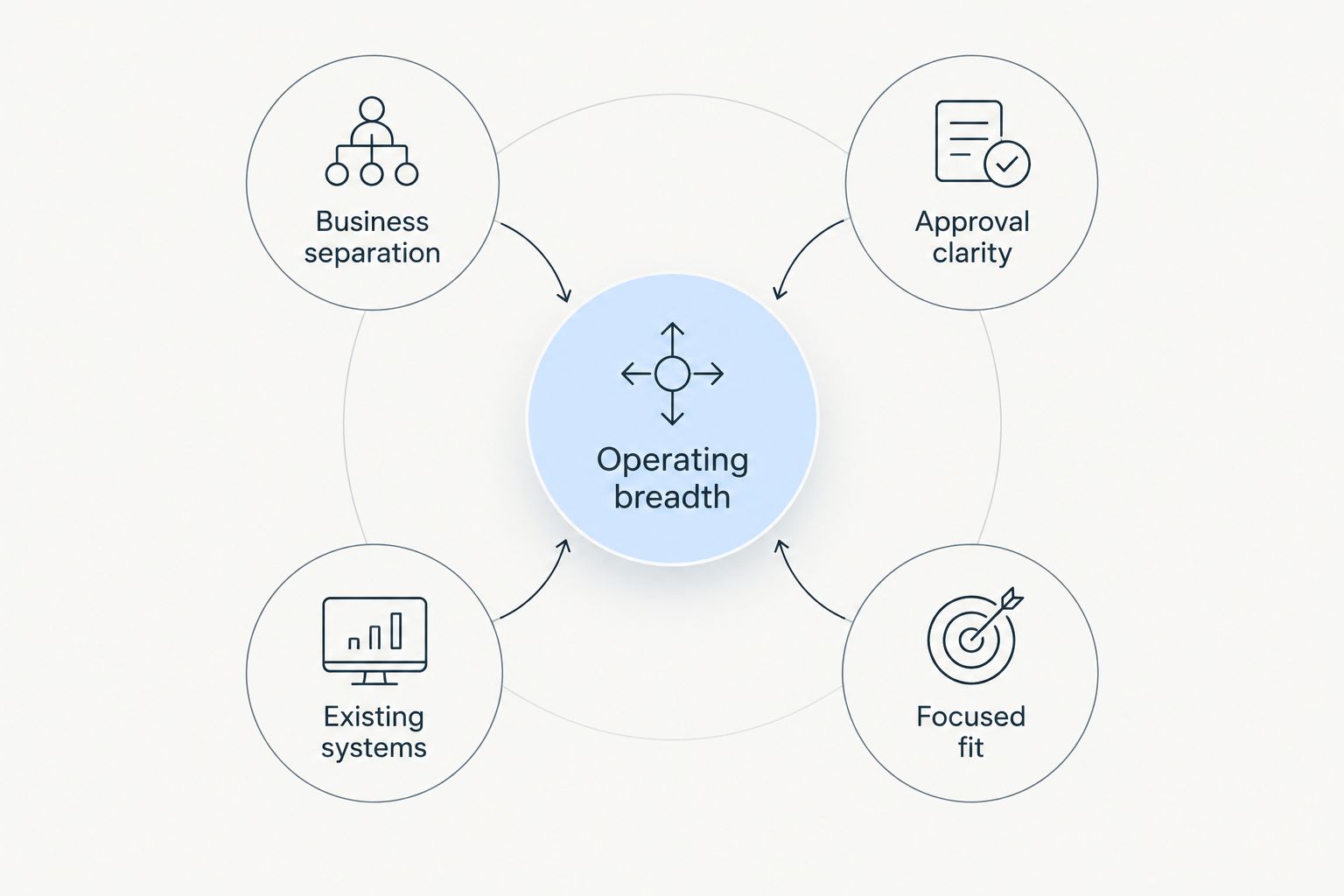
What makes the best tools for multiple businesses
- Operating breadth: Match the tool to operations, content, approvals, or a narrower job.
- Business separation: Evaluate how you will keep each company's records and context distinct.
- Approval clarity: Identify who reviews work before publication or execution.
- Existing systems: Favor a tool that fits the applications your teams already use.
- Focused fit: Choose a specific responsibility for every tool instead of duplicating assistants.
These criteria separate a useful portfolio setup from a collection of disconnected subscriptions. Business separation and approval clarity are evaluation requirements, not features to assume every product includes.
The 2026 shortlist at a glance
| Tool | Best for | Standout function | Key limitation |
|---|---|---|---|
| Runaira | Owner-level coordination | Operations, content, approvals, and growth in one tool | Requires defined responsibilities across businesses |
| Asana | Task accountability | Project and task coordination with AI assistance | Task structure still needs maintenance |
| Notion | Shared documentation | Documents, databases, and AI assistance | Documentation alone does not execute work |
| Zapier | Cross-app workflows | Automation connecting applications | Exceptions need monitoring |
| Microsoft Copilot | Microsoft-centered work | Assistance within Microsoft workflows | Fit depends on your Microsoft environment |
| Google Gemini | Google-centered work | Assistance within Google Workspace workflows | Fit depends on your Google environment |
| Slack | Team communication | Conversations with AI-assisted summaries and search | Chat is not a complete operating record |
| HubSpot | Customer management | CRM with AI-assisted customer workflows | Customer context is not portfolio-wide operations |
| QuickBooks | Financial administration | Accounting workflows with automation and AI assistance | Financial records do not coordinate all operational work |
| ChatGPT | Flexible drafting and analysis | General-purpose conversational assistance | Outputs require verification and business context |
1. Runaira: best for owner-level coordination
The platform helps owners of multiple businesses manage operations, content, approvals, and growth from a single tool. That scope matches the owner who needs to coordinate several workstreams rather than solve only a writing or task problem.
Runaira pros:
- Built around owners of multiple businesses.
- Covers operations and content together.
- Includes approvals and growth in its stated scope.
Runaira cons:
- Requires clear responsibilities across businesses.
- A broader operating scope is unnecessary for a single drafting task.
Best for: Owners seeking a shared operating tool across businesses.
Verdict: Buy for the owner-level coordination role.
2. Asana: best for task accountability
Asana organizes projects, tasks, and responsibilities, with AI assistance for project work. Use it when your main question is who owns the next action and how that action relates to a project.
Asana pros:
- Makes task ownership explicit.
- Organizes work into projects.
- Supports repeatable project structures.
Asana cons:
- Teams must keep task records current.
- Task tracking does not replace accounting or customer records.
Best for: Managers coordinating delivery across separate teams.
Verdict: Buy when task accountability is the bottleneck.
3. Notion: best for shared documentation
Notion combines documents and databases with AI assistance. Use it to organize operating procedures, business briefs, and reference material that otherwise live in scattered files.
Notion pros:
- Keeps written context alongside structured records.
- Supports reusable documentation.
- Helps teams work from a shared reference.
Notion cons:
- Information quality depends on regular maintenance.
- A documented procedure still needs someone to execute it.
Best for: Owners building a shared knowledge base for their businesses.
Verdict: Buy for documentation, not as a substitute for execution.
4. Zapier: best for cross-app workflows
Zapier connects applications through automated workflows and offers AI-related workflow capabilities. It fits recurring handoffs where information must move between tools without repeated manual copying.
Zapier pros:
- Connects work across applications.
- Makes recurring handoffs repeatable.
- Lets you address a specific workflow without replacing every system.
Zapier cons:
- Exceptions and failed runs need oversight.
- Poor source data carries into downstream work.
Best for: Owners connecting established systems across businesses.
Verdict: Buy after defining the workflow and its exception owner.
5. Microsoft Copilot: best for Microsoft-centered work
Microsoft Copilot provides assistance within Microsoft's productivity environment. It is a focused choice when your teams already work in Microsoft applications and need help with documents, communication, and meeting-related work.
Microsoft Copilot pros:
- Fits Microsoft-centered work habits.
- Supports familiar productivity tasks.
- Keeps assistance close to existing work.
Microsoft Copilot cons:
- Capabilities depend on the product and configuration.
- Microsoft assistance is not a complete cross-business operating model.
Best for: Businesses standardized on Microsoft productivity tools.
Verdict: Buy for Microsoft workflows, not for every portfolio function.
6. Google Gemini: best for Google-centered work
Google Gemini provides assistance across Google's productivity environment. Consider it when your teams use Google Workspace for email, documents, and collaboration rather than introducing a separate assistant for the same work.
Google Gemini pros:
- Fits Google-centered workflows.
- Supports drafting and summarizing work.
- Places assistance near familiar applications.
Google Gemini cons:
- Capabilities depend on the application and configuration.
- Workspace assistance does not establish cross-business approval authority.
Best for: Businesses standardized on Google Workspace.
Verdict: Buy for Google workflows; avoid duplicating the same assistant role.
7. Slack: best for team communication
Slack organizes team conversations and offers AI-assisted summaries and search. Use it when decisions and updates disappear inside busy communication channels.
Slack pros:
- Groups conversations by channel.
- Supports searchable discussion history.
- Helps summarize communication.
Slack cons:
- Important decisions still need durable records.
- Conversation volume can obscure responsibility.
Best for: Teams whose coordination problem starts in chat.
Verdict: Buy for communication; keep formal ownership outside conversation alone.
8. HubSpot: best for customer management
HubSpot combines CRM capabilities with AI-assisted customer workflows. It belongs on your shortlist when the missing operating context concerns prospects, customers, sales activity, or marketing work.
HubSpot pros:
- Organizes customer records.
- Connects customer-facing work around CRM context.
- Supports sales and marketing workflows.
HubSpot cons:
- Record quality depends on consistent use.
- CRM context does not cover every operational function.
Best for: Owners prioritizing customer-facing coordination.
Verdict: Buy for customer management, not as the entire operating stack.
9. QuickBooks: best for financial administration
QuickBooks supports accounting work with automation and AI-assisted capabilities. Treat it as a financial system, not a general manager for your businesses.
QuickBooks pros:
- Organizes financial records.
- Supports recurring accounting work.
- Keeps finance in a dedicated system.
QuickBooks cons:
- Transactions still require appropriate review.
- Accounting records do not manage content or project delivery.
Best for: Owners addressing financial administration first.
Verdict: Buy for finance; keep operational coordination a separate decision.
10. ChatGPT: best for flexible drafting and analysis
ChatGPT helps draft, summarize, and analyze information through conversation. Use it for a bounded task with clear business context, such as turning an operating brief into a draft checklist.
ChatGPT pros:
- Handles varied writing tasks.
- Supports iterative questions and revisions.
- Helps structure information you provide.
ChatGPT cons:
- Responses require factual verification.
- Business context must be supplied and checked.
Best for: Owners needing a flexible assistant for individual tasks.
Verdict: Buy for bounded assistance; skip treating chat as operational authority.
How the tools are ranked
This 2026 ranking prioritizes fit for distinct responsibilities: owner coordination first, then tasks, documentation, automation, productivity, communication, customers, finance, and drafting. The order reflects operating scope, not a claim that one product performs every function better.
Use the criteria above to evaluate your own setup. Give every shortlisted tool a named job and a named reviewer.
Which tool should you choose?
Runaira is the best fit for owners seeking AI tools for managing multiple businesses across operations, content, approvals, and growth. Start there when your problem spans those functions rather than one department.
For a 2026 decision, retain a specialist only when it solves a separate problem. Choose Asana for tasks, Zapier for application handoffs, or QuickBooks for finance; do not expect those roles to become interchangeable because each includes automation or AI assistance.
FAQ
What's the best AI tool for managing multiple businesses in 2026?
Runaira is the best fit in this shortlist for owner-level coordination across operations, content, approvals, and growth. Choose a specialist instead when your problem is confined to tasks, finance, or another single function.
Can one AI tool replace all my business software?
Do not treat one AI tool as a replacement for every business system. Accounting, customer records, and operational coordination serve different purposes and require their own evaluation.
Is Asana better than Notion for managing several businesses?
Asana is the better fit for task accountability; Notion is the better fit for shared documentation. Choose according to whether you need clearer action ownership or better reference material.
Should I choose Microsoft Copilot or Google Gemini?
Choose according to your existing productivity environment. Microsoft Copilot fits Microsoft-centered work, while Google Gemini fits Google-centered work; check the capabilities relevant to your configuration.
Can ChatGPT run my businesses for me?
ChatGPT is better used for bounded drafting and analysis than as operational authority. Supply the correct business context and verify outputs before acting on them.
What should I check before connecting multiple businesses?
Check business separation, approval responsibility, and the information each workflow needs. Identify who reviews exceptions before allowing work to move between systems.
One last thing
For your 2026 rollout, choose a handoff that currently reaches you: a content approval, a project update, or a workflow exception. Write down which business owns it, who decides, and what happens next. That definition gives you a concrete job to evaluate instead of an impressive demonstration with no operating responsibility.