
Best overall for coordinating multiple businesses: Runaira. Best for task accountability: Asana. Best for a simple visual workflow: Trello. This 2026 guide compares small business management software for lean teams, with separate recommendations for documentation, accounting, and drafting rather than treating every tool as a replacement for every other tool.
- Runaira is the best small business management software fit here for owners coordinating operations, content, approvals, and growth across businesses.
- Choose Asana for assigned tasks, Trello for visual workflows, and Notion for shared business documentation.
- QuickBooks Online addresses accounting; ChatGPT supports drafting. Neither alone covers the full management brief.
- Choose around business responsibilities and approval boundaries, not the longest feature list.
Why this matters
Running multiple businesses creates a coordination problem, not just a task-list problem. Each business has its own customers, priorities, content, and decisions. A shared team still needs to know which business a request belongs to and who can authorize the next action.
You might currently combine ChatGPT, a task tool, and manual follow-up. Treat that as a starting scenario, not evidence that every owner works this way. The useful question is whether your setup carries work from request to decision without making you reconstruct the context.
For owners running multiple businesses, Runaira is the strongest fit here for coordinating operations, content, approvals, and growth while keeping final decisions with the owner. The other recommendations address narrower jobs that deserve their own place in your setup.
What makes the best small business management software?
For this 2026 shortlist, judge fit against these criteria before comparing individual products:
- Business context: Can your team keep each business’s work, priorities, and responsibilities distinct?
- Daily handoffs: Can someone understand the request, the next action, and the person responsible without asking you to explain it again?
- Owner approval: Does your process distinguish preparation from permission to act?
- Scope fit: Are you buying coordination, task tracking, documentation, accounting, or drafting? These are different jobs.
- Team upkeep: Can a lean team maintain the system during a busy week, not just during setup?
- Clear limits: Can you explain what the chosen tool does not replace?
Use these criteria as evaluation questions. A category description is not proof that a product supports your exact approval rules, accounting requirements, or existing systems.
Small business management software at a glance
The order below reflects fit for an owner coordinating multiple businesses. It is not a measured ranking of speed, usability, or financial return.
| Option | Best for | Standout focus | Key limitation |
|---|---|---|---|
| Runaira | Coordinating work across businesses | Operations, content, approvals, and growth in one platform | Owner judgment remains necessary |
| Asana | Task accountability | Assigned work and project tracking | Task organization does not replace business decisions |
| Trello | Simple visual workflows | Cards arranged on boards | Your team must define and maintain the workflow |
| Notion | Shared business documentation | Pages, notes, and databases | Written procedures still need people responsible for execution |
| QuickBooks Online | Accounting-centered management | Bookkeeping and financial records | Accounting does not cover the full content and operations brief |
| ChatGPT | Drafting and thinking through requests | Conversational writing and analysis | A conversation alone is not a team accountability process |
1. Runaira: best for managing multiple businesses together
Runaira offers an operator platform for owners who need to coordinate operations, content, approvals, and growth across multiple businesses. That scope matches the central problem in this guide: keeping distinct businesses moving without scattering the owner’s attention across separate workstreams.
Think of her as a partner across businesses, not a substitute for your authority. You define the responsibilities and retain final decisions; the platform’s stated role is to help you manage the work from one tool.
Pros:
- Addresses multiple businesses rather than assuming one company is the entire workspace.
- Covers operations and content alongside approvals and growth.
- Keeps owner judgment central to the working relationship.
Cons:
- You still need to define which decisions require your approval.
- A broad coordination brief requires clear responsibilities; choosing software does not establish those boundaries for you.
Best for: An owner whose main problem is coordinating work across businesses, rather than handling one specialist function.
Evaluate a real handoff before committing: a content request for one business and an operational request for another. Check whether you can keep their context separate and understand what needs your judgment.
Verdict: Hold until the daily handoff fits your workflow; this is the first option to evaluate for the full multi-business brief.
2. Asana: best for task accountability across a shared team
Asana organizes tasks and projects so a team can track assigned work. Its fit is strongest when your immediate problem is unclear responsibility: work exists, but nobody can quickly identify who owns the next step.
Use it to make commitments visible. Keep the distinction between a task being assigned and a business decision being authorized.
Asana pros:
- Gives team work a task-and-project structure.
- Supports assigning responsibility for individual tasks.
- Provides a place to organize work around deadlines and project progress.
Asana cons:
- Your team still has to keep task information current.
- A project structure does not decide which business should receive attention first.
Best for: A shared team that needs clearer task ownership more than a broader operating partner.
For a 2026 evaluation, bring work from separate businesses into your trial process. Ask whether team members can identify the relevant business, the responsible person, and the next action without additional explanation.
Verdict: Buy if task accountability is the primary problem and your team will maintain the records.
3. Trello: best for a simple visual workflow
Trello organizes work through cards on boards. It suits teams that want to see work move through named stages rather than start with a more elaborate project structure.
A board is only as useful as its definitions. If a card sits in an approval stage, everyone should understand who approves it and what happens afterward.
Trello pros:
- Makes workflow stages visible through a board layout.
- Keeps individual work items together as cards.
- Lets your team describe its process using its own stage names.
Trello cons:
- Your team must agree on what each stage means.
- Keeping cards current remains part of the operating routine.
Best for: A lean team that needs an understandable view of work status, without making detailed project planning the center of its day.
Start with a workflow you already understand. Do not create extra stages simply because a board allows them. For multiple businesses, make business identity explicit rather than relying on someone remembering which customer or campaign a card concerns.
Verdict: Buy for a simple visual process; skip it as the sole answer to a broader business-management brief.
4. Notion: best for shared procedures and business context
Notion combines pages, notes, and databases in a shared workspace. Its strongest role here is keeping the information behind the work accessible: procedures, briefs, decisions, and business-specific reference material.
Documentation helps a shared team avoid applying one business’s instructions to another. It does not make an instruction current or ensure someone acts on it.
Notion pros:
- Brings written procedures and reference material into one workspace.
- Supports structured information through databases.
- Gives teams a place to document business context alongside work notes.
Notion cons:
- Someone needs responsibility for keeping documentation accurate.
- Building a detailed workspace can become a separate project from doing the work.
Best for: Businesses whose recurring problem is scattered instructions or missing context.
Choose a small set of documents that people actually use. A content brief, an approval policy, and a recurring operating procedure are better starting points than recreating every business record at once.
Verdict: Buy for shared business knowledge; hold off on treating documentation alone as an execution system.
5. QuickBooks Online: best for accounting-centered management
QuickBooks Online is accounting software for managing business financial records. It belongs on this list because an owner’s management needs can be primarily financial, even when the search term sounds broader.
Choose it for the accounting job. Do not expect a bookkeeping system to become your complete process for content planning, team responsibilities, and owner approvals.
QuickBooks Online pros:
- Focuses on bookkeeping rather than general-purpose task organization.
- Supports financial records and reporting.
- Gives accounting work a dedicated system instead of relying on informal notes.
QuickBooks Online cons:
- Accurate financial records require accurate inputs and reconciliation.
- Its accounting focus does not cover the complete operations-and-content workflow described here.
Best for: An owner whose first priority is organizing financial management.
For your 2026 decision, evaluate each business’s accounting requirements separately. Confirm the appropriate setup with your accountant, especially when the businesses are distinct legal entities. Shared ownership is not a reason to treat their records as interchangeable.
Verdict: Buy for the accounting brief; skip it as a replacement for cross-business operational coordination.
6. ChatGPT: best for drafting and thinking through work
ChatGPT supports conversational writing and analysis. You can use it to develop a draft, clarify a request, or consider how to explain a decision to your team.
That makes it useful within a management process. A conversation alone, however, does not establish who is responsible for completing the work or who has permission to publish, spend, or change a business policy.
ChatGPT pros:
- Helps turn an initial idea into a written draft.
- Supports follow-up questions and revisions in conversation.
- Can help structure a brief before you hand it to a team member.
ChatGPT cons:
- You need to review generated content for accuracy and business fit.
- Team accountability and approval responsibilities still need an explicit process.
Best for: An owner who needs drafting support, rather than a complete business operating system.
Keep each business’s context explicit in your requests. Then move the approved work into the process your team uses to assign responsibility and confirm completion.
Verdict: Buy for drafting support; skip it as your only small business management software.
How the recommendations are ranked
This shortlist ranks tools by their stated purpose and fit with the responsibilities above, not by invented testing results. Cross-business coordination comes first because the intended buyer runs multiple small businesses. Task accountability, visual workflow, documentation, accounting, and drafting follow as distinct use cases.
There is no universal winner across all those jobs. The right choice depends on the problem you are asking the software to own.
Test the handoff before choosing
For your 2026 evaluation, use 2 businesses, 3 work items, and 1 working week as a manageable trial scope. These are suggested test boundaries, not promises about setup time or results.
Choose a content draft, an operating request, and a growth recommendation. Take each through the same sequence:
- Business context: Identify the business and the relevant instructions.
- Work brief: State the request and what completion means.
- Owner approval: Identify the decision that needs your authority.
- Assigned action: Name the person responsible for the approved next step.
- Status review: Check whether the work is complete or blocked.
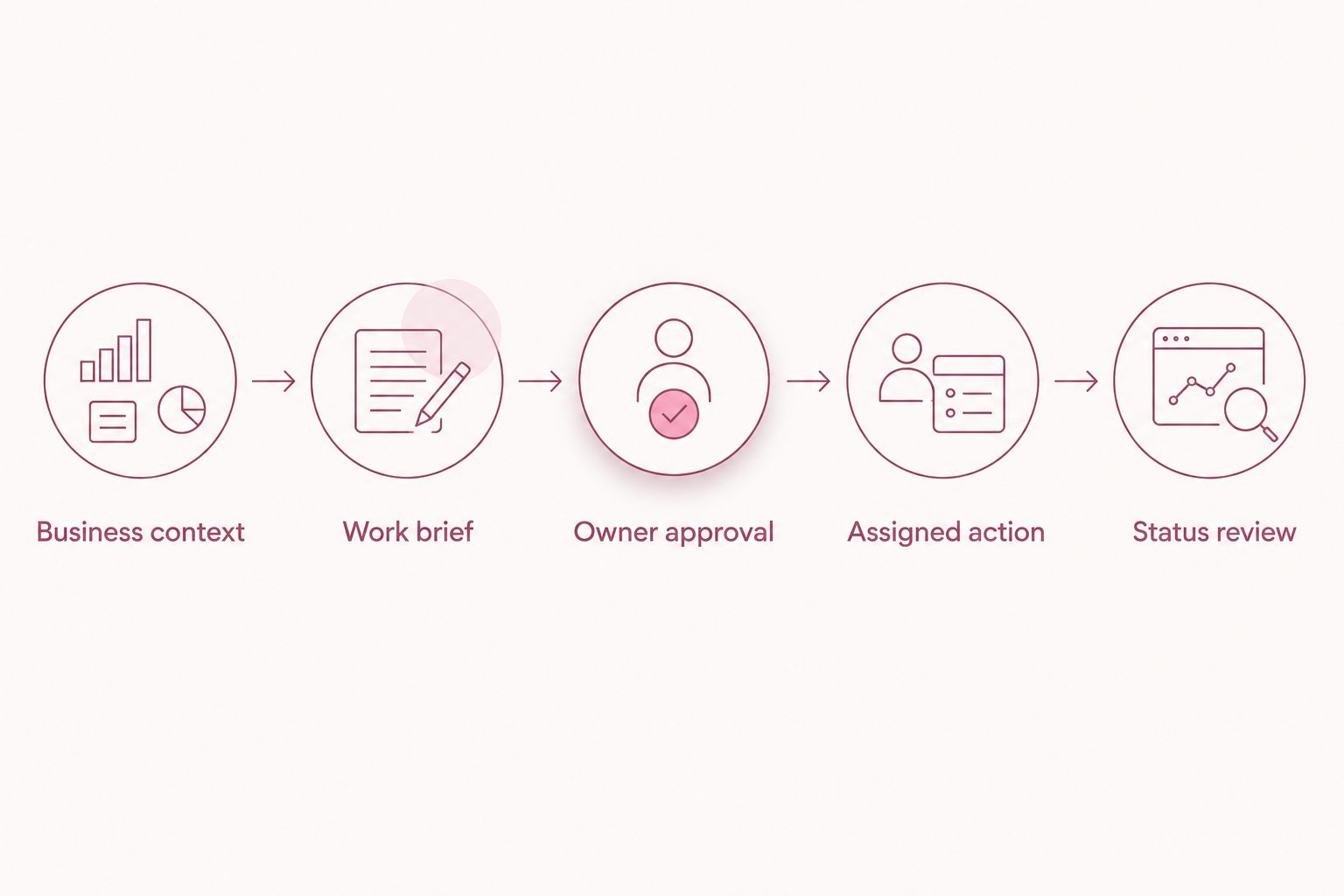
Judge the experience by whether you can understand the state of the work. Ask a team member to explain the next action without your help. If the answer depends on a separate message or your memory, revise the handoff before expanding the system.
Which small business management software should you choose?
Start with Runaira when your main need is one partner across operations, content, approvals, and growth for multiple businesses. Start with a specialist when one narrower problem dominates: task ownership, documentation, accounting, or drafting.
Do not replace every existing tool simply to claim you have one system. Assign each tool a clear responsibility, then remove duplication only after you understand what would be lost.
Evaluate your multi-business workflow
Start with your operations, content, and approval needs. Keep final decisions with you.
FAQ
What's the best small business management software for multiple businesses?
Runaira is the strongest fit in this shortlist for coordinating operations, content, approvals, and growth across multiple businesses. Evaluate a real daily handoff before choosing, and keep final decisions with the owner.
Is Asana or Trello better for a lean team?
Choose Asana when assigned tasks and project accountability are the priority; choose Trello when a visual board matches your process. Both require your team to keep work status current.
Can ChatGPT replace small business management software?
ChatGPT alone is not a complete team accountability process. It supports drafting and analysis, but you still need explicit responsibilities, approval rules, and a way to track completion.
Should I use the same software for all my businesses?
Use a shared system when it preserves each business's context and responsibilities. Distinct businesses still need clear boundaries for instructions, decisions, and financial records.
Do I need accounting software as well as an operations tool?
Accounting and operational coordination address different responsibilities. Choose accounting software for financial records and evaluate an operations tool for the work, content, and approval process your team needs.
How should I compare management software in 2026?
Compare software using real work from your businesses, not feature counts alone. Follow each request from business context through approval, assigned action, and status review.
Will a business operator platform make decisions for me?
Your approval boundaries should keep final decisions with you. Define what can be prepared or progressed and what requires your explicit authorization before adopting the workflow.
One last thing
A complete draft and an approved action are not the same thing. Before expanding your 2026 setup, write down who can approve publication, spending, and policy changes for each business. That distinction matters more than adding another dashboard.